Compare this with other toolsSave it to your board and evaluate your options side by side.
Save to board

BuildOps Reviews & Product Details

Value at a Glance

Averages based on real user reviews.

Time to Implement

3 months

BuildOps Media

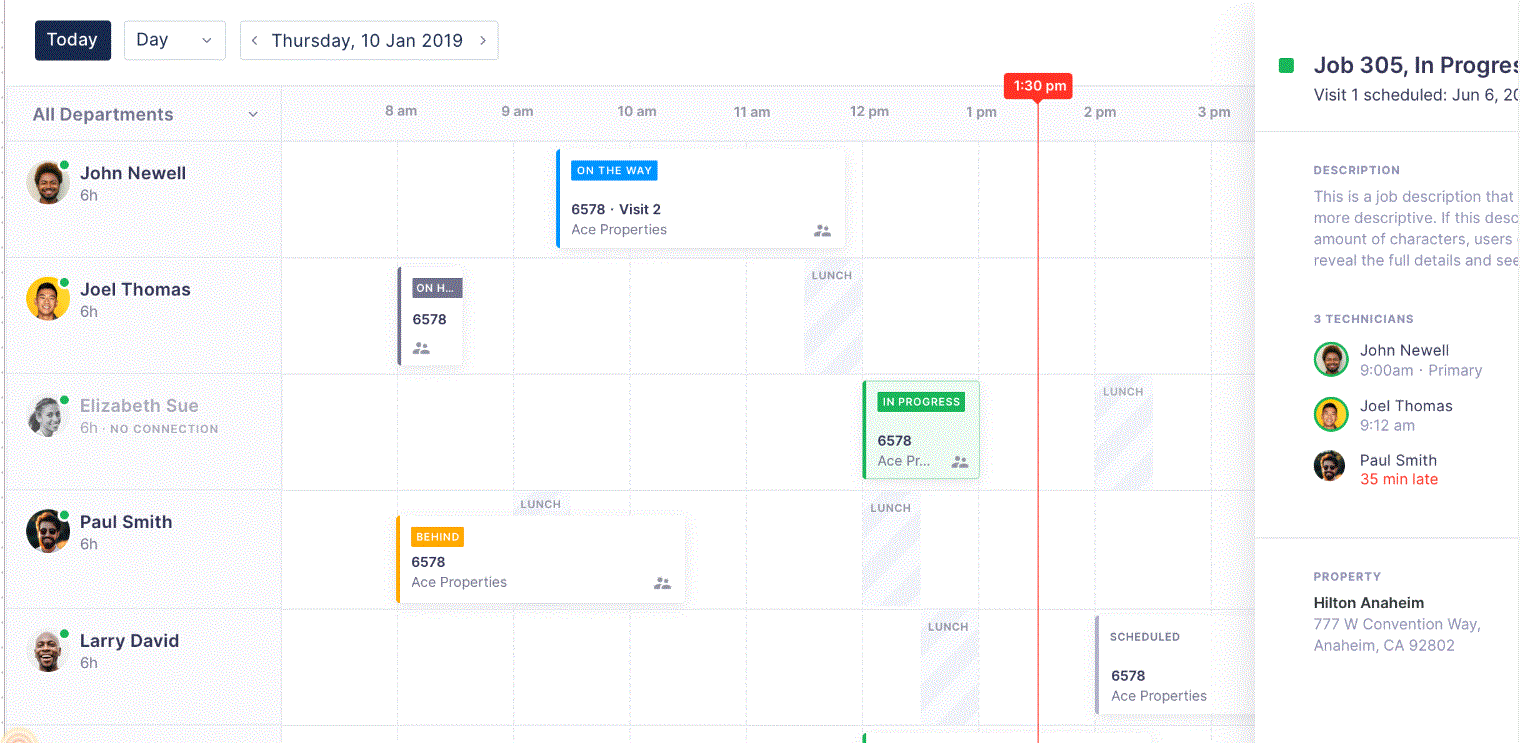
BuildOps Demo - Dispatch & Schedule
Drag and drop dispatch board with automated scheduling. Gated workflows ensure your techs capture meaningful pull-through work.b. Stand out from the competition with digital invoicing and job reports.c. Improve first-time fix rates by reviewing all customer history before the job.
BuildOps Demo - Manage and Visualize
State-of-the-art reporting that can highlight and visualize any aspect of your business. Combined with project management, asset tracking, team and jobs management and much more.
BuildOps Demo - Construction Project Management
BuildOps’ construction project management dashboard displays the KPIs that are critical for success: - Projected profit and profit to date - Margins, over-billings, and under-billings - Budgeting, job costing, and utilization amounts - On-site weather conditions Forecast timelines accura...
BuildOps Demo - Dispatching GEO view
Dispatching is Hard, We Make it Easier Keep your dispatchers happy by allowing them to create, edit, and view jobs without leaving the dispatch map. Your office team can see where your techs are in the field and their availability for the next job. When a customer calls with an emergency, b...
BuildOps Demo - Reporting Every Part of Your Operation
Every single field in the BuildOps platform can produce a report. Take quotes — measure these and more in a matter of seconds: - Number of quotes issued - Close rate - Sales reps closing the most business - Customers with the most quoted work - Customers with the highest acceptance rating ...
Play BuildOps Video
Play BuildOps Video
Play BuildOps Video
Play BuildOps Video
Play BuildOps Video
Product Avatar Image

Have you used BuildOps before?

Answer a few questions to help the BuildOps community

BuildOps Reviews (67)

Reviews

BuildOps Reviews (67)

4.3
67 reviews

Review Summary

Generated using AI from real user reviews
Users consistently praise the user-friendly interface and responsive customer support of BuildOps, highlighting how these features enhance their operational efficiency. Many appreciate the platform's ability to consolidate various functions into one system, making it easier to manage tasks and workflows. However, some users note that the software can be glitchy at times, which may disrupt their experience.

Pros & Cons

Generated from real user reviews
View All Pros and Cons
Search reviews
Filter Reviews
Clear Results
G2 reviews are authentic and verified.
ZB
Date Entry
Mid-Market (51-1000 emp.)
"Streamlined Procurement and Reliable Anywhere Access with Build Ops"
What do you like best about BuildOps?

Every part of the procurement process feels streamlined, and it’s easy to switch between different Work Orders as needed. Support is expedient and helps within the hour until a claim is finalized. I can rely on Build Ops to work from home and the office, and having availability from the internet helps me do my job from any location, making it convenient for the company. Review collected by and hosted on G2.com.

What do you dislike about BuildOps?

Whenever I ask for support, the initial response is from an A.I. bot that doesn't assist in actually fixing the problem but rather stating why there is a problem. I'd prefer to have my concerns addressed by an actual person first and foremost, and if the person assisting me has to use A.I. tools that is not my concern. As a customer, I feel my time is respected and valued when my initial concerns with a software issue are addressed by a person. Review collected by and hosted on G2.com.

JM
Small-Business (50 or fewer emp.)
"Streamlines HVAC Operations with Ease"
What do you like best about BuildOps?

I appreciate how BuildOps integrates with MITRE, allowing me to pull the time directly for payroll each week. It helps track the time that our guys spend on each job, which is great for payroll processing. Additionally, it's quite convenient since our guys can enter their clock-in time and do all their paperwork straight from their company phones for each service call. The projects module is also helpful in organizing everything in one place, and we can easily refer back to job records even years later. The implementation team was very supportive, making the initial setup not too difficult. Review collected by and hosted on G2.com.

What do you dislike about BuildOps?

I think sometimes we could improve the fact that they only allow fleet tracking through one program. It would be nice to have open integration so that we could use our analytics. They need to be a little bit more accepting of multiple integration options. Review collected by and hosted on G2.com.

Jodi F.
JF
Administrative Support Specialist
Small-Business (50 or fewer emp.)
"User-Friendly and Efficient for Permit Coordination"
What do you like best about BuildOps?

I really appreciate that BuildOps is extremely user-friendly and clearly laid out, which makes important information obvious on the customer or specific job screens. The features that include all aspects of the job, including permitting, are very helpful for my role as a permit coordinator. The tags in BuildOps quickly help identify if a permit is required or has been issued, and I can enter permit fees into inventory costs ensuring job costing is accurately calculated. Additionally, BuildOps works well for contract jobs, and I find that the project management area has evolved and continues to improve. I also like the Dashboard feature for technicians and how I can customize Dispatch boards to focus on different crews without having to display everyone. Review collected by and hosted on G2.com.

What do you dislike about BuildOps?

I think project management could improve the pay application process, so it is more in line with the industry standard AIA form. Review collected by and hosted on G2.com.

MH
Mid-Market (51-1000 emp.)
"Streamlined Ops with Rapid Support"
What do you like best about BuildOps?

I use BuildOps for tracking the hours of technicians and creating new work orders. I love the chat feature in BuildOps because if I have any questions, AI or a real member can resolve the issue. It's easy to sign in on any device, and it saves travel times by letting me know which technicians are close to the job. BuildOps has everything, including billing and creating new customers. The initial setup was easy and fast to learn, and I got it quickly. I'm still discovering a lot of new features since BuildOps is always coming up with new features to make the job easier. Review collected by and hosted on G2.com.

What do you dislike about BuildOps?

Communication from the mobile app to the computer dispatch board doesn't show where the techs are at that time. There's a delay. Review collected by and hosted on G2.com.

Brad C.
BC
Small-Business (50 or fewer emp.)
"Efficient Scheduling, Needs Better Reporting"
What do you like best about BuildOps?

I really enjoy using BuildOps as our operations platform in the commercial HVAC industry. It's great for scheduling and recording technician notes, which are then passed along to our customers. I appreciate its capabilities for generating service quotes and invoicing as well. What I like most about BuildOps is the dispatch board and scheduling within their platform. I also find their visit summary reporting for jobs quite useful. It helps us get our technicians to where they need to be, inform them of what's needed, track their time, and support our customers effectively. Additionally, I appreciate that it integrates with our QuickBooks Online. Review collected by and hosted on G2.com.

What do you dislike about BuildOps?

The reporting in BuildOps is a serious issue that needs to be addressed. Not only is it the least intuitive report creation process, but when one finally does get reports created, the information is not reliable. This is a huge issue for us as business owners. I am still very surprised that they don't have better basic reports, that all companies need. The canned reports that they do provide are incomplete, and provide inaccurate and/or inconsistent data. This is hands down the biggest issue with BuildOps, and it is mission critical information. That was also before my time, but I heard that the onboarding process was a challenge. I also personally know 5 other business owners that have struggled through the onboarding process with BuildOps. Review collected by and hosted on G2.com.

Verified User in Construction
UC
Mid-Market (51-1000 emp.)
"AI-Powered Billing and Custom Filters Make Job Tracking Easy"
What do you like best about BuildOps?

I like the AI feature for generating customer billings. The simple job headers are helpful for quickly seeing a job’s status. The ability to customize filters is a huge help, especially since different users need different informatio. . I Review collected by and hosted on G2.com.

What do you dislike about BuildOps?

The procurement layout is a lengthy process with 3-way matching. It could definitely be more efficient with some guidance from actual users. I know other customers have compatible accounting software which makes it easier for them. We rely on export files to upload into our software which does not always work. Many upgrades affect our version that causes issues. There always seems to be quirks within different areas that require BO support. It feels like the software is being created as we work thru it. A button or box added throws everything off. The contract module is not user friendly or tailored to our industry also. Review collected by and hosted on G2.com.

TG
SSR
Mid-Market (51-1000 emp.)
"Fragmented Information Makes Workflow Challenging"
What do you like best about BuildOps?

ability to drag and drop attachments into jobs/quotes, and the ability to create data queries/dashboards Review collected by and hosted on G2.com.

What do you dislike about BuildOps?

it's a little too segmented...bits and pieces of information are scattered throughout many places and things that should go together are not always found together. The recommendations are probably the thing I dislike the most because the service summary that the tech wrote is not always attached to the recommendation.

It needs to help the user connect these pieces together more efficiently. For example, if a dispatcher creates a new job for a property, then BuildOps should alert them if there are open quotes for that property. That way, we could possibly prevent sending a tech out to a site to troubleshoot the same unit that we already have an open quote for (this happens).

Or, if a tech tries to submit a recommendation for a quote, but the customer has a comprehensive agreement, then there should be something that alerts the tech to the fact that the repair is covered by that agreement and does not need to be quoted. Review collected by and hosted on G2.com.

jonathan r.
JR
Mid-Market (51-1000 emp.)
"Effortless Job Management with Top-End Usability"
What do you like best about BuildOps?

I like BuildOps because it keeps everything in one place, simplifying the process of looking up jobs and keeping job attachments organized, which helps me keep up with the schedule. It lets me track the progress of jobs, see if they are fully built, and maintain visual records of every job, all in one spot. What I like the most is the ease of use, which saves me time, and as they say, time is money. I've noticed improvements since I first started using it. Review collected by and hosted on G2.com.

What do you dislike about BuildOps?

It lags at some time. Sometimes it lags. Other than sometimes, it could kinda lag. Review collected by and hosted on G2.com.

JL
Mid-Market (51-1000 emp.)
"Efficient Documentation, Slight Update Challenges"
What do you like best about BuildOps?

I appreciate BuildOps for its ease of accessing information, which allows me to easily access customer information and build rapport with customers. I also like the organization of documents, which helps in documenting work performed for customers and creating job history on units for both internal and external use. These features make BuildOps valuable to me as they provide a way to support the customer in need. Review collected by and hosted on G2.com.

What do you dislike about BuildOps?

Sometimes, when BuildOps completes updates, some functions prior to the update disappear which becomes aggravating. Review collected by and hosted on G2.com.

AG
Office Administrator
Small-Business (50 or fewer emp.)
"Simple to Use with Outstanding Support"
What do you like best about BuildOps?

Build ops have been easy for me to learn since fairly new to the system. I like how simple some things are to work through. I love that our rep Jorge is fast at getting back to me if I need help. Review collected by and hosted on G2.com.

What do you dislike about BuildOps?

Only thing at this time that I dislike is that some things change without knowing. For example when entering a Non productive time to the dispatch schedule overhead is gone now. Review collected by and hosted on G2.com.

Questions about BuildOps? Ask real users or explore answers from the community

Get practical answers, real workflows, and honest pros and cons from the G2 community or share your insights.

GU
Guest User

What is Shark Byte CRM used for?

GU
Guest User

What is BuildOps used for?

Pricing Insights

Averages based on real user reviews.

Time to Implement

3 months

Return on Investment

9 months

Average Discount

7%

BuildOps Comparisons
Product Avatar Image
ServiceTitan
Compare Now
Product Avatar Image
ServiceTrade
Compare Now
Product Avatar Image
Procore
Compare Now
BuildOps Features
Calendar
Dispatch
Roles
Location
Employee Communication
Behavior Monitoring
Reports
Analytics
Invoicing
AI Text Summarization
AI Image-to-Text
Product Avatar Image
BuildOps